JWT Login
JWT is an open standard (RFC 7519) that defines a compact, self-sufficient, and secure way of transmitting information among parties as a JSON object. The passed information can be verified and trusted since it is digitally signed. JWTs can be signed using a secret (with the HMAC or other algorithms) or a public/private key pair using RSA.
LoginRadius supports the following encryption algorithms for the JWT flows:
- HS256
- HS384
- HS512
- RS256
- RS384
- RS512
- ES256
- ES384
- ES512
JWT (JSON Web Token) is a popular method of SSO, which is widely used by B2C applications, and through this system, you can allow your customers to log in to an application that supports JWT. LoginRadius acts as an Identity Provider; it means LoginRadius can authorize a third-party application that will act as a Service Provider.
JSON Web Token Structure
The JWT will be encrypted with an algorithm configured in the LoginRadius Admin Console. The decrypted JWT contains the Header, Payload, and Secret/Private key.
The following explains the information they contain:
- Header: It contains metadata about the type of token and the algorithms used to secure its contents.
{
"alg": "HS256",
"typ": "JWT"
}
- Payload: It contains the claims, a JWT claim is a key/value pair in a JSON object. In the example below, "key1": "value1" and "key 2" : "value2" pairs are profile field mapping pairs configured in the JWT app in the LoginRadius Admin Console.
{

"iss": "https://<lrSiteName>.hub.loginradius.com/",
"sub": "{uid}",
"jti": "unique string",
Key1: value1,
Key2: value2,
"iat": 1573849217,
"nbf": 1573849217,
"exp": 1573849817
}
The payload can be fully customized to include data mapping for any LoginRadius normalized user profile fields. It can be configured directly from the LoginRadius Admin Console to control the data mapping as well as the encryption algorithm.
Note: LoginRadius provides custom attributes, so it is possible to customize the JWT response. The following is a sample attribute:
{
"type": "basic",
"title": "Login"
}
- Secret/Public Key: It should be the same value as you have configured in the JWT app in the LoginRadius Admin console.
JWT Login Guide
This guide will take you through the process of setup and implementation of the JWT SSO. It covers the following:
-
Functional flow of JWT SSO
-
Configuration you need to do in LoginRadius Admin Console
-
Implementing JWT SSO with LoginRadius APIs
JWT SSO Flow
The following flow chart shows how JWT flow works between IDP and SP, where IDP here is LoginRadius and SP is customer’s application:
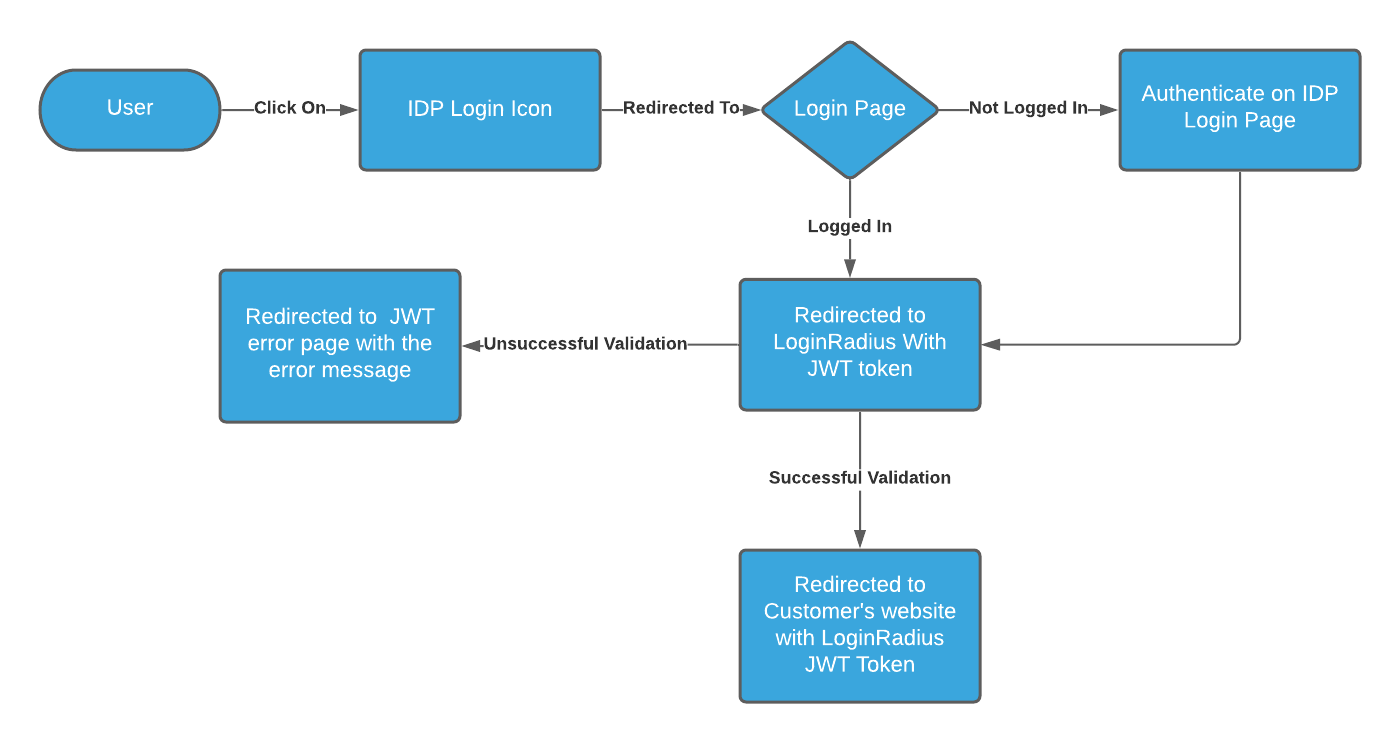
LoginRadius supports a delegated redirect SSO flow through which you can redirect your customer to LoginRadius Identity Experience Framework, where your customer can do account management actions.
Upon successful login or social login, the customer will be redirected to the return URL along with the JWT for this authentication session. Implementation of JWT in Loginradius: